MasterCard’s Card Validation Code 2 – CVC 2

MasterCard, just like bigger rival Visa, puts security codes on all credit and debit cards that bear its logo, as an additional security feature to help merchants who accept payments in a card-not-present environment fight fraud. By asking a customer for her card’s security code at the checkout, the merchant helps ensure that the customer is in physical possession of her card. The security codes’ effectiveness is boosted by the fact that they are not encoded into the cards’ magnetic stripes and merchants are prohibited from storing them, so hackers are unlikely to get their hands on them.
Yet, for all their usefulness, plenty of merchants refuse to ask for their customers’ security codes. The stated rationale is that asking for too much information at checkout reduces merchants’ conversion rate so much that the potential benefits — fewer fraudulent transactions — are negated by the immediately incurred lost sales. Well, there is a good reason to believe that such thinking is flawed, as I will explain in a minute. But first, let’s see what CVC 2 is.
What Is MasterCard’s CVC 2
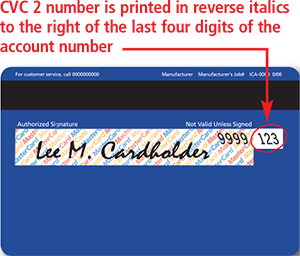 The CVC 2, which stands for Card Validation Code 2, is located on the back of all MasterCard cards. It is a three-digit code indent printed on the signature panel of MasterCard cards. The CVC 2 is preceded by the last four digits of the card’s account number, printed in the signature panel. This added security measure enables e-commerce and MO / TO retailers to verify that the buyer has the actual card in his or her possession during a card-not-present transaction. Visa’s equivalent security code is called Card Verification Value 2 (CVV2).
The CVC 2 is a security feature that all major payment gateways and virtual terminals support and your payment processor should make it available to you.
How to use CVC 2
The CVC 2 is used in e-commerce or MO / TO transaction in the following manner:
- Ask your customers for the last three digits in the signature panel on the back of the MasterCard card. Do not ask for the CVC 2 number, as your customer will most likely have no idea what this is.
- Depending on the response your customer gives to your CVC 2 request, include one of the following indicators in your authorization request, along with the card’s expiration date and the account number:
Indicator When to Use It 0
If the CVC 2 is not included in the authorization request. 1
If the CVC 2 is included in the authorization request. 2
If your customer has stated that the CVC 2 is illegible. 9
If your customer has stated that the CVC 2 is not on the card. - The card issuer will reply to your request with one of the CVC 2 result codes listed below. Take it into consideration, along with all other factors in determining the validity of the transaction.
Result Code Recommended Action M — Match The CVC 2 is valid. Complete the transaction, taking into account all other transaction characteristics. N — No Match The CVC 2 is not valid. View this result as a very strong indicator of fraud. It may, however, be the result of a key-entry error, so you may consider resubmitting the CVC 2 request. P — CVC 2 request not processed You should resubmit the request. S — the cardholder has stated that the CVC 2 is not on the card The CVC 2 code should be on all MasterCard cards. Consider following up with your customer to verify that he or she has checked the correct card location. U — the card issuer does not support CVC 2 In this case you should evaluate all available information and decide whether to proceed with the transaction or investigate further.
As you see, it is quite a straightforward procedure.
Do not Store CVC 2!
Storing of CVC 2 is prohibited. Never keep or store CVC 2 codes once a transaction is completed. Storing CVC 2 codes is prohibited and could result in fines. You may store other account information, e.g. cardholder name, account number and expiration date but not the CVC 2.
Why Should You Use CVC 2?
Using CVC 2 will benefit your organization in a number of ways, including:
- Enhanced fraud protection. Card-not-present merchants run a greater risk of processing fraudulent transactions than their store-front counterparts. Using CVC 2 provides an additional step in the process of verifying the validity of both the card and the cardholder.
- Reduced chargebacks. Reduced fraud leads to reduced fraud-related chargebacks. Chargebacks due to other reasons, however, will remain unaffected by the use of CVC 2.
- Improved bottom line. Fraudulent and charged-back transactions lead to lost revenue and can mean extra processing time and costs. CVC 2 helps limit such losses and minimize operating costs.
To that we may also add that CVC 2 can also be used for validation purposes in some higher-risk card-present transactions.
Should You Be Using CVC 2?
As I’ve already noted, merchants have refrained from using CVC 2, arguing that asking for too much information at checkout and using too many fraud prevention tools can do more harm than good. And I have read studies, which claim to confirm these observations.
Yet, I find it very difficult to believe that a customer who has just entered her name, address and card number in the checkout form, would be so annoyed by a request to provide a three-digit code that she would rather abandon her purchase, because of it. Isn’t it at least as plausible that she just couldn’t find the thing? So, before ditching the CVC 2 field altogether, I strongly suggest that you test different ways of asking your customers for it and perhaps display an image that shows where they should be looking for it. Chances are that this would solve your conversion rate problem.
Image credit: Jordonmeyer.com.
Google Steps Up NFC Push
The Chinese Payment Companies Are Colossal… But What They’re Up Against Is Epic.