Visa Card Verification Value 2 – CVV2
All four major U.S. payment networks have implemented credit card security codes to help merchants prevent e-commerce fraud. The idea in using the security codes is very simple: by being able to provide the security number that is located on the back of her card when making a payment online, the customer proves that she is in physical possession of the card at the time the payment is being made. As the security codes are not encoded into the cards’ magnetic stripes and merchants are prohibited from storing them into their transaction logs, criminals are having a much harder time getting their hands on them and that is what makes them valuable. And that is also why you should ask your customers for their cards’ security codes at your own website’s checkout.
Unfortunately, there is no single standard regulating the use of card security codes across the payment networks and each one of them maintains its own rules. Yet, these are all quite straightforward and anyway, they share more features than they have differences, so if you learn how to use one network’s security codes properly, you’ll be able to easily do the same with the others.
Yet, for all of the security codes’ benefits, many merchants still refuse to ask for them in their online checkout forms, because, they believe, doing so may confuse some of their customers or otherwise put them off and lead to lost sales. For my part, I believe that this fear is unfounded and that a merchant stands to lose much more from not asking for the code than she stands to gain from it. Hopefully, by the time you’ve read this post, you will have come to agree with me. Now let’s take a close look at Visa’s security code.
Visa’s Card Verification Value 2 (CVV2)
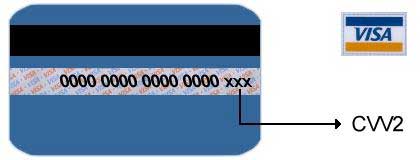
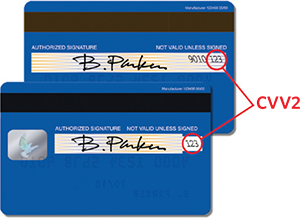
As already noted, all major credit card companies have placed card security codes on their credit and debit cards as an additional security feature for merchants who accept Visa cards as payment over the telephone or online. Visa’s Card Verification Value 2 (CVV2) is a three-digit number printed on the back of every Visa credit or debit card. It is located in the top right corner of the signature panel or immediately to the right of it. It is preceded by the last four digits of the card’s account number, printed in the signature panel. CVV2 was introduced to help e-commerce and mail order and telephone order (MO / TO) merchants verify that their customers are in a physical possession of their cards at the time of the transaction. It is a feature that all major e-commerce payment gateways support and your payment processing provider should make it available to you.
How to use CVV2 in E-Commerce Transactions
If your organization operates in either the e-commerce or the MO / TO industry, you should follow these procedures when accepting credit and debit cards:
- Always ask your customers for the last three digits in the signature panel on the back of the card. Do not ask for the CVV2 number as customers will most likely have no idea what this is.
- Depending on the response the customer gives to your CVV2 request, you should include one of the following indicators in your authorization request, along with the card’s expiration date and the account number:
- “0” — if the CVV2 is not included in the authorization request.
- “1” — if the CVV2 is included in the authorization request.
- “2” — if your customer has stated that the CVV2 is illegible.
- “9” — if your customer has stated that the CVV2 is not on the card.
- When the card issuer replies with the CVV2 result code, you should take it into consideration, along with all other factors in determining the validity of the transaction. You will receive one of the following result codes:
- “M” — Match — the CVV2 is valid.
- “N” — No Match — the CVV2 is not valid, a very strong indicator of fraud. It may, however, be the result of a key-entry error, so you may consider resubmitting the CVV2 request.
- “P” — CVV2 request not processed – you should resubmit the request.
- “S” — the cardholder has stated that the CVV2 is not on the card. The CVV2 code should be printed on all Visa cards. In the case of an “S” response you should verify that the customer is looking for it in the right place.
- “U” — the card issuer does not support CVV2. In this case you should consider using other fraud prevention services.
As you see, it’s a straightforward process and, if you do a good enough job at showing to your customers where they should be looking for their card’s CVV2, there is no reason why they should be so inconvenienced as to abandon the sale.
Using CVV2 at the Point of Sale
 Although, as I have noted several times, the intended use of Visa’s CVV2 is in card-not-present (e-commerce and MO / TO) transactions, Visa tells us that in some markets it has also proven to be an effective tool in minimizing fraud in the card-present setting, where magnetic stripe data is used.
In fact, Visa allows U.S. merchants, which accept card payments in a face-to-face environment to include CVV2 in the authorization request for U.S. domestic key-entered transactions, in place of taking a manual card imprint. This process is only applicable in cases when the magnetic stripe cannot be read by the point-of-sale (POS) terminal.
As the CVV2 code is not stored onto the magnetic stripe, it is not exposed to theft through skimming or data sniffing and provides an additional validation option for an issuer in higher-risk transactions. In the card-present sales setting, CVV2 may be used for verifying that the card that is presented for payment is a legitimate Visa card and not a counterfeit one. When a card-present merchant receives a CVV2 Result Code N — No Match, she has three options:
- Decline the transaction.
- Ask again for the CVV2 code to obtain a match.
- Accept the transaction and the associated risk.
CVV2 validation should only be used for transactions which present higher risk to the merchant and issuer.
What Does Using CVV2 Do for You?
The use of CVV2 benefits merchants in a number of ways, including:
- Enhanced Fraud Protection. E-commerce and MO / TO merchants run a greater risk of processing transactions using stolen account numbers than their brick-and-mortar counterparts. Using CVV2 provides an additional step in the process of verifying the validity of both the card and the cardholder.
- Minimized Chargebacks. Reduced fraud leads to reduced fraud-related chargebacks. Chargebacks due to other reasons, however, will remain unaffected by the use of CVV2.
- Improved Bottom Line. Fraudulent and charged-back transactions lead to lost revenue and to additional processing costs. CVV2 helps limit such losses.
To that we may also add CVV2’s validation uses in higher-risk card-present transactions, as described above.
Do not Store CVV2!
You can and should store other account information, e.g. cardholder name, account number and expiration date, but not the CVV2. If found storing card security codes, you will be penalized, whether or not you knew it were prohibited.
Should You Be Using CVV2?
Many have argued that asking for too much information and using too many fraud prevention services can do more harm than good. I’ve talked to merchants who’ve told me that when they experimented with turning such services on and off to see how that would affect the rate of completed transactions. They’ve found that the more information they request from a customer, the less likely she is to go through the whole process and make a payment. And I’ve come across studies which seem to confirm these observations.
Naturally, having performed their tests and / or read the studies I’ve just mentioned, some of the merchants I’ve talked to have decided to take out one or more of the security checks out of their transaction process. The way they see it, by doing so they increase the sales conversion rate sufficiently enough to more than offset any potential losses from fraudulent transactions.
Well, given the information that has been available to them, these merchants’ decision seems a sensible one. But I can’t help but wonder whether they haven’t missed something. See, the CVV2 code is three-digit long. Would requiring it, on its own, really cause you to abandon the checkout process? Isn’t it just possible that most, perhaps the vast majority, of customers who have indeed abandoned the checkout process have done so simply because they couldn’t locate the thing? So, before dispensing with CVV2 altogether, I strongly recommend that you test different ways of asking your customers to enter it and perhaps offer an image to show where they should be looking for it. I suspect that this would solve the problem.
Image credit: HD.org.
Who Is Using Payday Loans?
MasterCard’s Global Clearing Management System
The problem I have is that when I add too many fields in the checkout form I get lower conversion rates so I removed the CVV2 from it. It did help.